 Laranest
Zero configuration
Laranest reads composer.json, .env and your schedule to detect the Laravel and PHP versions, queues, Horizon, the scheduler, Reverb and Vite. You review it and press start.
 Open source · Free
Point Laranest at a project and it gives it its own PHP, its workers and HTTPS athttps://<app>.localhost. No Docker, no admin rights, no config files. For Linux, WSL2, Windows and macOS.
curl -fsSL https://github.com/nbullorini/laranest/releases/latest/download/install.sh | bashcurl -fsSL https://github.com/nbullorini/laranest/releases/latest/download/install.sh | bashirm https://github.com/nbullorini/laranest/releases/latest/download/install.ps1 | iexThen open http://localhost:9150. Supported platforms
Features
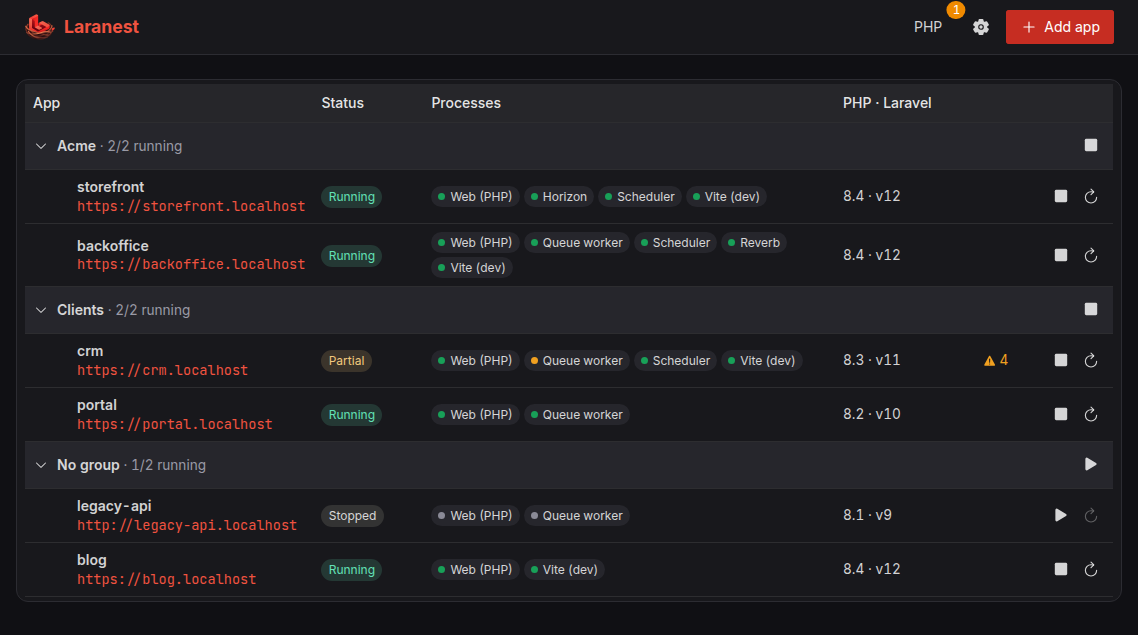
Laranest reads your project and runs it the way it runs in production, on your own machine.
Laranest reads composer.json, .env and your schedule to detect the Laravel and PHP versions, queues, Horizon, the scheduler, Reverb and Vite. You review it and press start.
No virtual machines, no containers, no background services you didn’t ask for. A single binary runs your apps as native processes, so your machine’s resources go to your code.
A PHP-FPM pool per app, plus its queue worker or Horizon, scheduler, Reverb and Vite. Crashed processes restart on their own, and every one has live logs.
Every app gets https://<app>.localhost, signed by a local certificate authority that your browsers trust, including on Windows when the apps run inside WSL2.
Each project runs on the PHP version its composer.json asks for, or the one you pin. Missing versions download on demand, and updates keep your php.ini.
PHP, Composer and Node are installed for your user only. Nothing touches your system packages, and the installer never asks for sudo or an administrator account.
Turn on dump capture for an app and every dump() and dd() lands in the panel, with the file and line that made it and the request or command it came from. No paid tier.
storage/logs in the panel: entries by level, searchable, each exception with its stack trace. Your AI assistant can read it too, through the MCP server.
Switch Xdebug on for one app: it loads into that app’s web process only and starts on a trigger from your browser, so everything else keeps running at full speed.
Show your work to a client or test a webhook: one click gives the app a public HTTPS link through a free Cloudflare tunnel, and Laravel builds its URLs with it.
Save an app’s PHP version, processes and custom commands to laranest.json and commit it. Everyone who adds the project gets the same setup, and a git pull keeps it in sync.
Dumps, the log viewer, Xdebug, sharing and the MCP server are part of Laranest, not of a paid plan. It is open source under the AGPL v3, and free.
Diagnostics
Laranest checks the most common configuration problems and every service your app depends on. When something fails, it tells you exactly what and where, so you don’t have to guess from a blank page or dig through a stack trace.
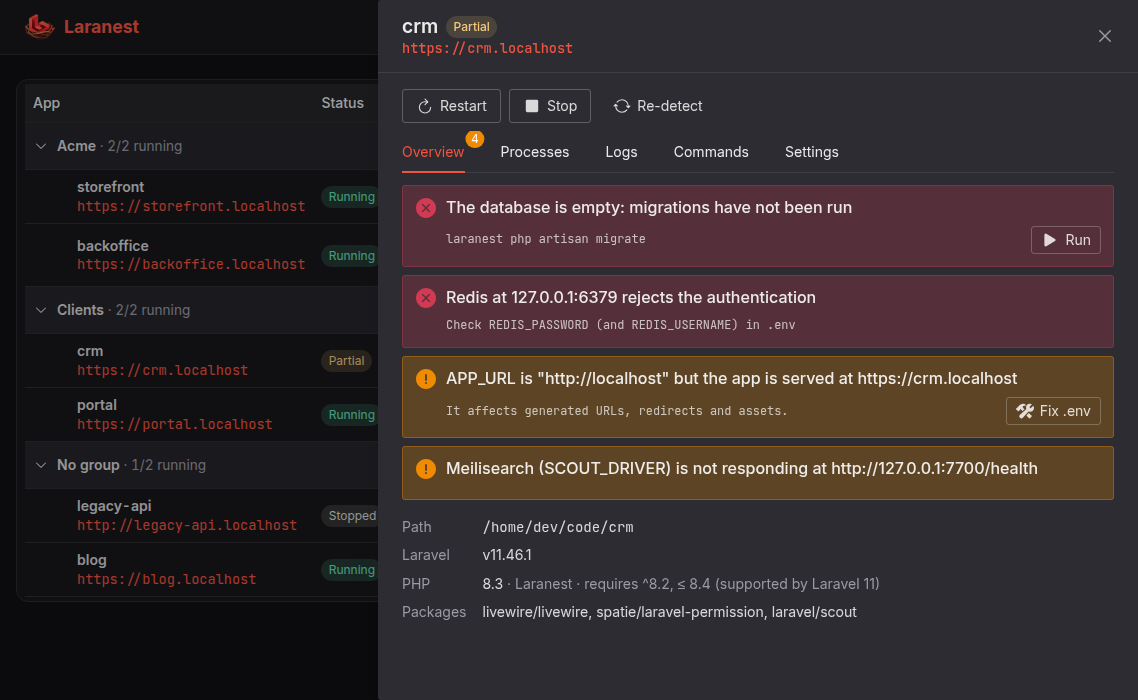
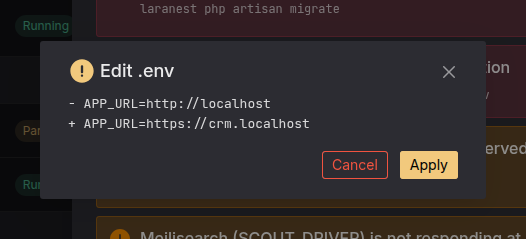
Many problems come with a one-click fix. Changes to .env are shown as a diff before anything is written, and commands such as php artisan migrate or npm install run from the panel with the project’s own PHP and Node.
The panel
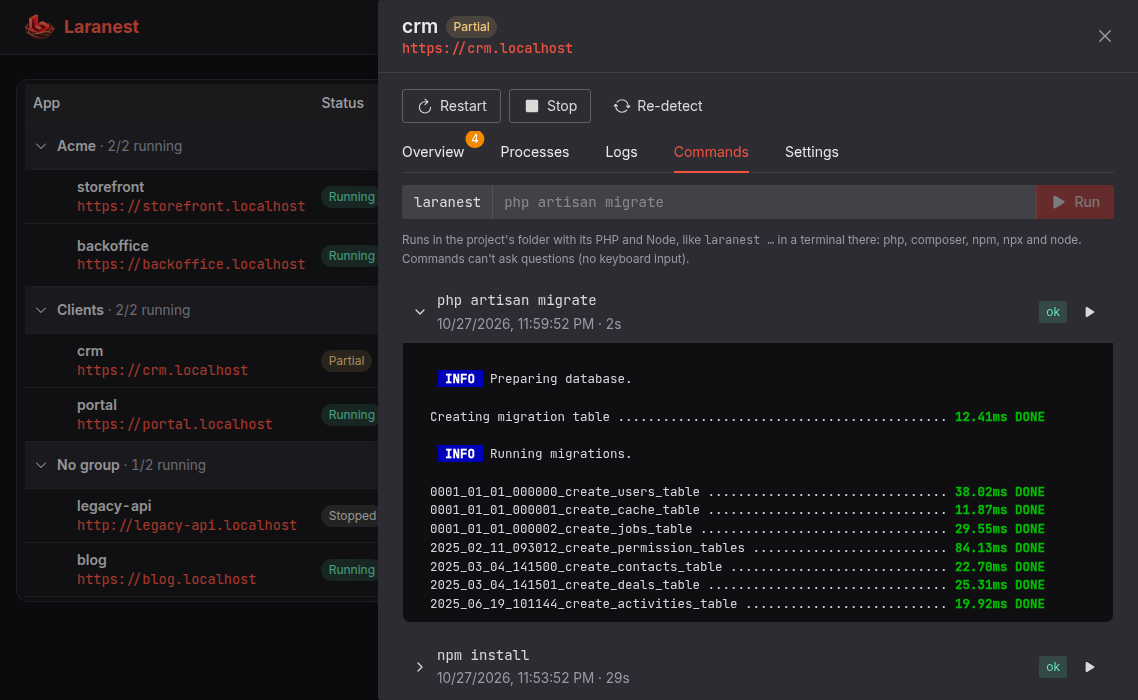
Commands run in the project’s folder with its own PHP and Node, and every run is kept with its output.
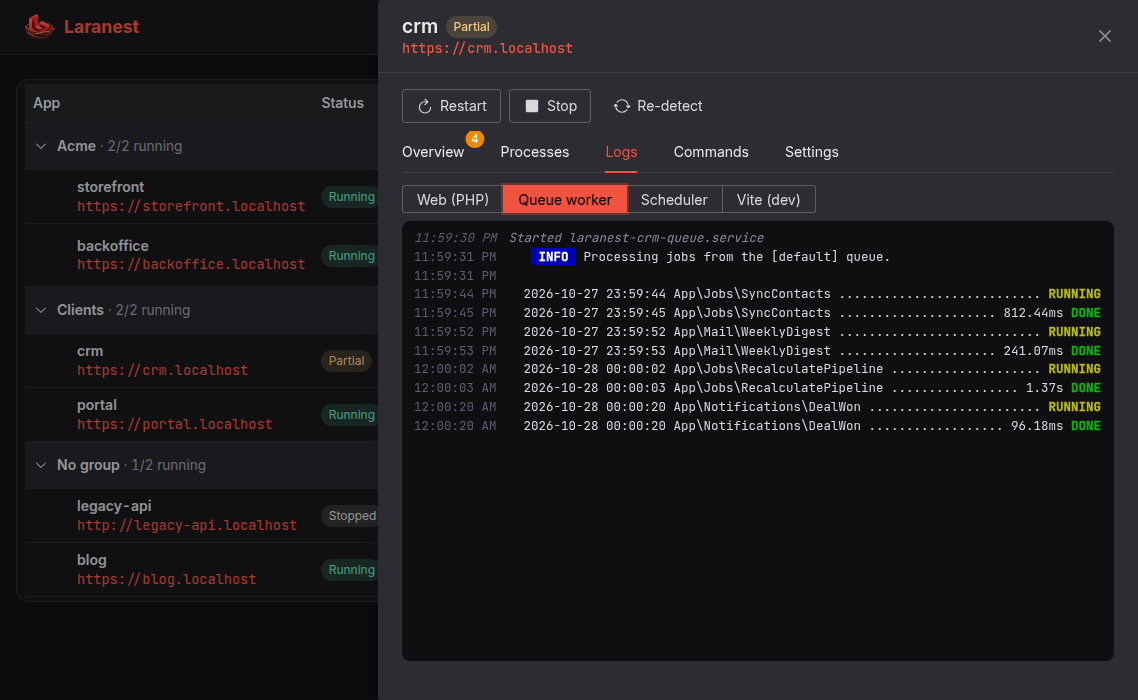
Follow the web server, queue worker, scheduler, Reverb or Vite of any app, in color, as it happens.
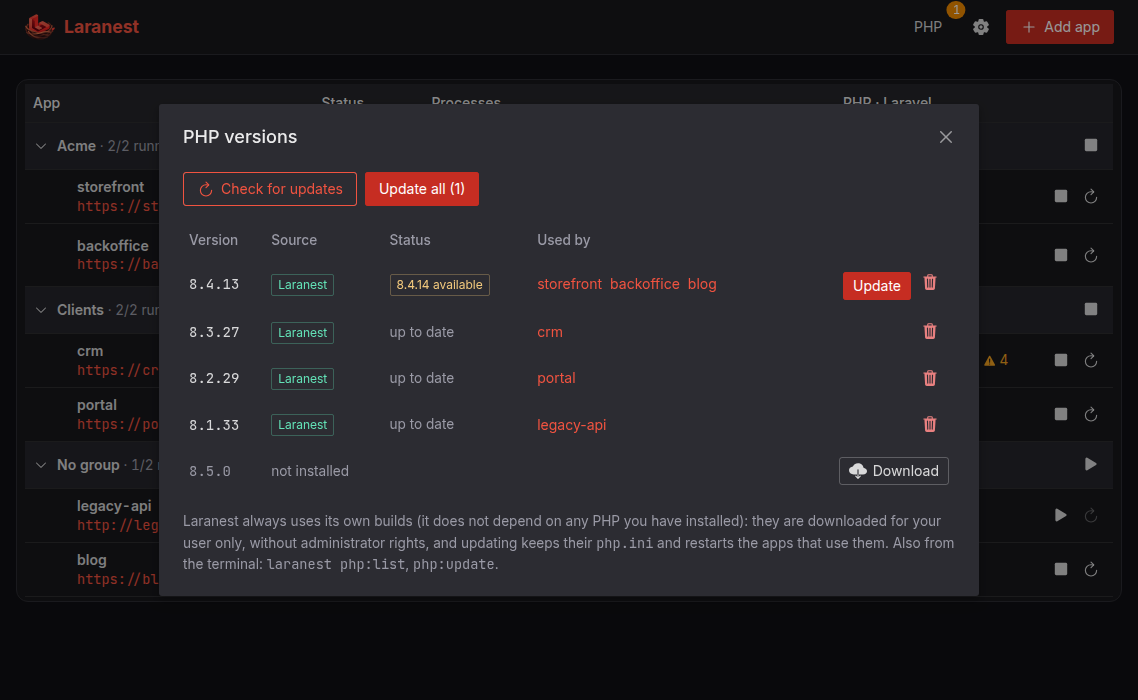
See which apps use each version, install new ones and apply updates. The affected apps restart automatically.
How it works
git clone to HTTPS in three stepsPick one of the Laravel projects Laranest finds in your home folder, or enter a path. Review the detected versions and processes.
If the project needs a PHP version you don’t have, Laranest downloads it. Then it starts the web server and every worker.
Your app is live at https://<app>.localhost. If something needs attention, the panel tells you what and how to fix it.
$ laranest php artisan migrate
   INFO  Running migrations.
  2025_10_01_120000_create_orders_table ... 38ms DONE

$ laranest npm run build
vite building for production...
✓ built in 1.84s

$ laranest shims enable
$ php -v   # the project’s PHP, in every folder
CLI
Prefix any command with laranest and it runs with the project’s own PHP and Node:php, composer, npm, npx and node. Enable the shims and plain php and composer follow each project automatically.
Manage PHP versions with laranest php:install and php:update, trust the local certificate authority with laranest trust, and stay current with laranest update.
AI assistants · MCP
Laranest includes an MCP server. Claude, Cursor, VS Code or any MCP client can add projects, change their settings, start and stop them, read their logs, fix their warnings and run artisan, composer or npm, with the same rules as the panel. Destructive actions ask you first.
claude mcp add -s user laranest -- laranest mcp{ "mcpServers": { "laranest": { "command": "laranest", "args": ["mcp"] } } }laranest, and the variant for AI apps on Windows reaching Laranest in WSL2.> Add ~/code/shop to Laranest and get it running ● laranest · inspect_project Laravel 12, PHP ^8.3, queue, Vite ● laranest · add_app shop ● laranest · get_app 2 warnings: APP_KEY is empty, the database has pending migrations ● laranest · fix_warning app_key ✓ .env updated ● laranest · run_command php artisan migrate ✓ exit 0 ● laranest · start_app shop shop is running at https://shop.localhost with its queue worker and Vite.
Platforms
Most Linux distributions, WSL2, Windows and macOS, on x86_64 and ARM64.
Any distribution with systemd 236+ and glibc 2.28+.
Any of those distributions with systemd enabled. Browse your apps from Windows, with trusted HTTPS.
Runs natively, without WSL or administrator rights.
Runs natively as a background service of your user, without administrator rights.
Tested on every change on Ubuntu 22.04 and 24.04 (x86_64 and ARM64), Windows Server 2025 and macOS 15 (Intel), and on Windows 11.
Open source
Laranest is licensed under the GNU AGPL v3. No account, no license key, no paid tier. Read the code, report issues, suggest features and help shape where it goes next.
A single Go binary with an embedded web UI and Caddy for HTTPS. Every line is on GitHub.
View repository →100+ regression checks on Linux and Windows, integration tests against real MySQL, PostgreSQL, Redis and Mailpit, and installs of 20 open source Laravel projects.
See the test suite →Found a bug, or a project Laranest doesn’t run yet? Open an issue. Pull requests are welcome.
Open an issue →Compare
One binary of about 60 MB of memory, running your apps as native processes. No containers, no virtual machines, no admin rights, and native on Windows too. Free and open source.
| Feature | Laranest | Lerd | Laravel Herd | Valet | Sail |
|---|---|---|---|---|---|
| Platforms | |||||
| Linux | ✓ | ✓ | ✕ | ✕ | ✓ |
| WSL2 | ✓ | ✓ | ✕ | ✕ | ✓ |
| Windows 10/11, native | ✓ | ✕ | ✓ | ✕ | ✕ |
| macOS | ✓ | ✓ | ✓ | ✓ | ✓ |
| Footprint | |||||
| What runs on your machine | One binary | Podman containers | Native app | Nginx + dnsmasq + PHP | Docker containers |
| Lightweight*Nothing heavy running in the background | ✓ | ✕ | ✕ | ✓ | ✕ |
| No prerequisites | ✓ | ✕ | ✓ | ✕ | ✕ |
| No sudo or admin needed | ✓ | ✕ | ✕ | ✕ | ✕ |
| Setup complexity | Low | Medium | Low | Medium | High |
| Day to day | |||||
| Validates .env and its services | ✓ | Partial | ✕ | ✕ | ✕ |
| Runs queue, scheduler, Reverb and Vite | ✓ | ✓ | Partial | ✕ | Manual |
| Custom processes | ✓ | ✓ | ✕ | ✕ | Via docker-compose.yml |
| Databases, Redis and mail | ✕ | ✓ | ✕ | ✕ | ✓ |
| Project settings in the repo | laranest.json | .lerd.yaml | herd.yml | PHP version | docker-compose.yml |
| MCP server for AI assistants | ✓ | ✓ | ✓ | ✕ | ✕ |
| Debugging | |||||
| dump() and dd() captured | ✓ | ✓ | ✕ | ✕ | ✕ |
| Laravel log viewer | ✓ | ✓ | ✕ | ✕ | ✕ |
| Instant Xdebug per app | ✓ | ✕ | ✕ | ✕ | ✕ |
| Public share link | ✓ | ✓ | Via Expose | ✓ | ✓ |
| License | |||||
| Open source | AGPL v3 | MIT | ✕ | MIT | MIT |
| Price | Free | Free | Free | Free | Free |
Based on each tool’s public documentation, comparing free versions. * Lightweight: no containers, virtual machines or desktop app running in the background. Tools that only run on Windows inside WSL2 count as not native. On macOS, containers run inside a Linux virtual machine. Something out of date? Let us know.
FAQ
Yes. Laranest includes an MCP server (laranest mcp): connect Claude Code (claude mcp add -s user laranest -- laranest mcp), Claude Desktop, Cursor, VS Code or any MCP client and it can list, add and configure your apps (advanced settings included), start and stop them, read logs, fix warnings and run artisan, composer and npm commands. It goes through the same rules as the panel, and tools that change things are marked so your client asks you before running them.
Any distribution with systemd 236 or newer (with a user session) and glibc 2.28 or newer: Ubuntu 20.04+, Debian 11+, Fedora, RHEL, Rocky and Alma 8+, CentOS Stream 9+, Arch, Manjaro, openSUSE, Linux Mint, Pop!_OS and more, on x86_64 and ARM64. Ubuntu is tested on every change; if something doesn’t work on your distribution, please open an issue.
No. Laranest connects to the services your .env points to, wherever they run (installed locally, in Docker or remote), and tells you clearly when one is down or misconfigured. This keeps it light and lets you choose how to run your services.
No. The only change it can make is to your .env file, and only after you review the exact diff and confirm it.
Laranest runs inside your Linux distribution as a user service and you browse from Windows as usual. It can trust its certificates in Windows and keep WSL running after you close the last terminal.
Horizon depends on the pcntl extension, which only exists on Unix. On Windows, Laranest runs queue:work for your queues instead. For projects that rely on Unix tooling, run Laranest inside WSL2.
Yes, and it will stay that way. Laranest is open source under the GNU AGPL v3. There is no account, license key or paid tier, and you can use it at work.
Yes: the same install command works on Apple silicon and Intel Macs. Laranest runs as a launchd agent of your user and downloads PHP builds for macOS. Apps are served on ports 8080/8443 for now, as macOS reserves 80 and 443 on localhost for administrators. It is tested on every change on macOS 15; if something doesn't work on your Mac, please open an issue.
Open an app’s Settings and save them to laranest.json: its PHP version, HTTPS, processes and custom commands. Commit the file. Whoever adds the project to Laranest starts from it, and when it changes after a git pull, Laranest applies it again. Names, groups, dumps and Xdebug stay personal.
Yes: Share gives a running app a public https://…trycloudflare.com link through a free Cloudflare quick tunnel, no account needed. Laravel builds its URLs with that address. Anyone with the link can open the app until you stop sharing it.
Turn Xdebug on in the app’s Settings. It loads only into that app’s web process and starts a session when your browser’s Xdebug helper extension sends the trigger, with your IDE listening on port 9003. On Linux it comes with Laranest’s PHP builds; on Windows it is downloaded from PECL. Not available on macOS yet.
Click “Update now” in the panel or run laranest update. Your apps, settings and PHP versions are kept. To remove it, laranest uninstall stops every app and removes the service.
Still have a question? Write to us at contact@laranest.dev.
One command, no admin rights. Your Laravel apps on HTTPS in a couple of minutes.
curl -fsSL https://github.com/nbullorini/laranest/releases/latest/download/install.sh | bashcurl -fsSL https://github.com/nbullorini/laranest/releases/latest/download/install.sh | bashirm https://github.com/nbullorini/laranest/releases/latest/download/install.ps1 | iex